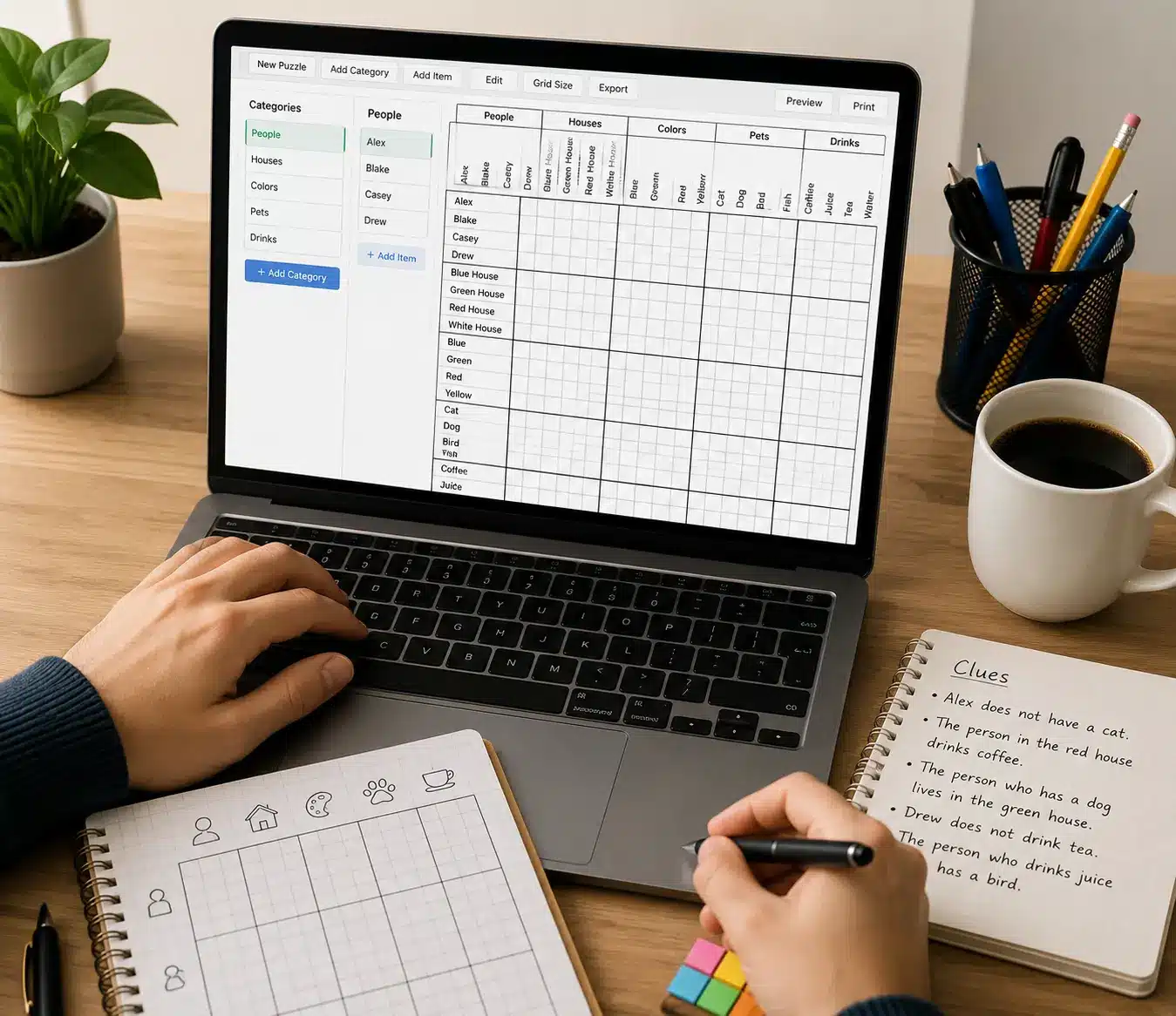

A logic puzzle generator creates a hidden set of matches, turns those matches into clues and presents a grid that can be solved through deduction. A reliable generator does more than shuffle names. It checks that the clues are consistent and that the puzzle has one intended solution.
Players use the generated clues to mark impossible combinations with X symbols and confirmed combinations with positive marks. Each deduction reduces the remaining choices until every item has exactly one match in every category.
Play Logic Puzzle Generator Game
Enter the Deduction Lab and complete three random grids before the 20-minute challenge ends. Choose Mixed, Clue Grid or Design mode, then select Easy, Medium or Hard difficulty.
The game contains a 20-puzzle bank and includes hints, mark clearing, answer checking, fullscreen play, scoring, streaks, accuracy, badges and Best Players.
Logic Puzzle Generators at a Glance
| Puzzle format | Categories, clue list and deduction grid |
|---|---|
| Generator starting point | A complete hidden solution |
| Player marks | X for impossible and a positive mark for confirmed |
| Quality requirement | Consistent clues and one intended solution |
| Online challenge | Three random grids in 20 minutes |
What Is a Logic Puzzle Generator?
A logic puzzle generator is software that assembles a clue-based deduction puzzle. It selects category items, creates a correct one-to-one matching, writes clues based on that matching and displays the information in a grid.
For example, a small puzzle may use three people, three pets and three favourite colours. Each person must match exactly one pet and one colour. The player does not see the answer table. Instead, they receive clues such as “Ava owns the cat” or “Ben does not own the bird.”
The generator’s job is not finished when the clues sound plausible. It must test the complete clue set. If two different answer tables satisfy every clue, the puzzle needs another clue. If no answer satisfies them, at least one clue conflicts with the hidden solution.
How a Generator Builds a Puzzle
- Select categories. Choose groups with the same number of distinct items, such as people, pets and hobbies.
- Create the hidden solution. Assign one item from every category to each person.
- Generate true clues. Derive direct, negative and indirect statements from the answer.
- Remove unnecessary clues. Keep the puzzle concise without losing its unique solution.
- Test every possibility. Confirm that exactly one complete arrangement satisfies all clues.
- Set difficulty. Control grid size, clue directness and the number of linked deductions.
- Present the board. Show readable labels, clues and cells that players can mark.
Building the answer first is important. It guarantees that every valid clue describes the same underlying arrangement.
Understand the Logic Grid
A grid compares two categories at a time. Row labels represent one category, while column labels represent another. Each cell asks whether that row item matches that column item.
In a three-person and three-pet grid:
- the rows might be Ava, Ben and Cora;
- the columns might be Cat, Dog and Bird;
- each row needs exactly one confirmed pet; and
- each pet column needs exactly one confirmed person.
A larger puzzle can contain several connected grid sections. A confirmed person-pet match may then combine with a pet-theme clue to reveal the person’s theme.
Worked Example: People and Pets

Use these clues:
- Ava owns the cat.
- Ben does not own the bird.
- Cora does not own the dog.
The first clue confirms Ava-Cat. Mark that cell positively, then place X marks in Ava-Dog, Ava-Bird, Ben-Cat and Cora-Cat because no other person can own the cat.
Ben has Dog or Bird remaining. The second clue removes Bird, so Ben owns the Dog. Cora must therefore own the Bird. The third clue agrees with that solution.
| Cat | Dog | Bird | |
|---|---|---|---|
| Ava | Confirmed | X | X |
| Ben | X | Confirmed | X |
| Cora | X | X | Confirmed |
Mark X for an Impossible Match
An X records that two items cannot belong together. Negative clues usually create the first X marks, but confirmed matches create more automatically.
When Ava is confirmed with the Cat, every other cell in Ava’s pet row becomes impossible. The other cells in the Cat column also become impossible. One positive match therefore creates several useful eliminations.
Record each elimination as soon as it becomes certain. Leaving a known cell blank makes later clues harder to interpret.
Confirm a Positive Match
A positive mark means the row and column items belong together. Confirm a match only when a clue states it directly or when all alternatives have been eliminated.
After marking a positive cell, complete its row and column with X marks. This maintains the one-to-one rule and can reveal another match without using a new clue.
In the online game, tap a grid cell once for X and twice for a positive match. If a mark was entered incorrectly, use Clear Marks or tap the cell until it returns to the required state.
Common Types of Generator Clues
Direct Match
A direct clue confirms one pair, such as “Ava owns the cat.” It gives an immediate positive mark and eliminates every competing cell in the same row and column.
Negative Match
A negative clue rules out one pair, such as “Ben does not own the bird.” Mark one X, then combine it with other eliminations.
Either-Or Clue
An either-or clue limits an item to two possibilities without confirming which one is correct. Keep both cells open until another clue removes one.
Linked Categories
A clue may connect items through a third category. If the Cat belongs to the person with the Space theme, a confirmed person-Cat match can transfer information to the theme grid.
Order or Position
Some generated puzzles use dates, prices or ranks. Clues such as earlier than, immediately before or two places after require an ordered list rather than a simple unordered category.
Use a Reliable Solving Method
- Read all categories. Identify the one-to-one relationships before marking the grid.
- Start with direct clues. Enter certain matches and exclusions first.
- Complete affected rows and columns. A confirmed match rules out every competitor.
- Process negative clues. Mark each impossible pair with an X.
- Look for a single remaining cell. If one possibility remains in a row or column, confirm it.
- Transfer linked information. Carry matches across the other category grids.
- Re-read indirect clues. Earlier statements often become useful after several marks are added.
- Check the complete puzzle. Make sure every row and column has one positive match.
Why a Unique Solution Matters
A valid logic puzzle should have one complete solution supported by the clues. A generator can test uniqueness by searching every arrangement that follows the category rules.
There are three possible results:
- One solution: the puzzle is determined and ready for a final quality check.
- Multiple solutions: another clue or restriction is required.
- No solution: at least one clue conflicts with another clue or the hidden answer.
Uniqueness does not mean every clue must be necessary. A beginner puzzle may include a helpful clue that confirms a deduction available elsewhere. Harder puzzles usually contain fewer direct confirmations.
What Makes a Fair Generated Puzzle?
- Every label is distinct and easy to read.
- The category sizes match.
- The one-to-one rule is explained.
- Each clue is true for the hidden answer.
- No clue depends on private knowledge or guessing.
- The complete clue set produces one solution.
- The difficulty comes from deduction depth, not vague wording.
A generated puzzle should also be tested by a human reader. Software can verify combinations, but a person is better at noticing an ambiguous pronoun, similar names or an instruction that is technically correct but hard to understand.
Easy, Medium and Hard Difficulty
Easy grids contain more direct clues and shorter deduction chains. They are useful for learning how positive marks eliminate alternatives.
Medium grids mix direct and negative clues. Players must revisit clues after completing several rows or columns.
Hard grids rely more heavily on linked information and multi-step elimination. Use notes carefully and avoid confirming a cell until all competing possibilities are ruled out.
Changing difficulty should not change the fundamental rules. Every level should remain consistent and solvable without guessing.
Mixed, Clue Grid and Design Modes
The online Deduction Lab provides three generator modes. Mixed rotates between available puzzle themes. Clue Grid focuses attention on reading and applying deduction clues. Design presents a different category theme while keeping the same grid-marking method.
Choose one mode for focused practice or use Mixed when you want varied labels and clue combinations.
How to Play the Online Game
- Enter a unique player name without spaces.
- Choose Mixed, Clue Grid or Design mode.
- Select Easy, Medium or Hard difficulty.
- Press Start Game to open the focused game screen.
- Read the generator clues before marking any cell.
- Tap once for X and twice for a confirmed match.
- Use Check Puzzle when every category has been completed.
- Solve all three random grids before the 20-minute timer ends.
The scoreboard tracks score, stars, streak, best result, attempts and accuracy. Hint can help when a deduction is missed, while Full Screen expands the board and Start Over begins the current challenge again.
Create a Logic Puzzle Manually
You can follow the same generator process on paper:
- Choose three categories with three or four items each.
- Write a private answer table containing all final matches.
- Create a few direct and negative clues that are true for that table.
- Add linked clues when the first set is too easy.
- Build a blank grid with one cell for every possible pair.
- Solve the puzzle from clues only, without looking at the answer table.
- Ask another person to test the wording and verify the same solution.
Keep the answer table separate from the player version. If a test solver reaches a different valid answer, add a clue rather than declaring one answer correct without evidence.
Common Mistakes
- Guessing a positive match: leave the cell open until a clue or complete elimination confirms it.
- Forgetting the row and column: one confirmed cell rules out all competitors in both directions.
- Ignoring linked grids: information often transfers through a shared category.
- Changing clue meaning: words such as either, neither and exactly have precise effects.
- Adding contradictory clues: every clue must remain true for the same hidden answer.
- Publishing without a uniqueness test: a plausible clue set may still allow several solutions.
Learning and Classroom Use
Logic grids can provide practice with careful reading, organizing information and explaining deductions. Teachers can choose familiar categories and allow students to compare the evidence behind each mark.
The activity works best when the goal is reasoning rather than speed alone. Ask players to explain which clue produced an X or why only one cell remained. Logic puzzles can support practice, but they should not be presented as a guaranteed measure of intelligence or a medical form of brain training.
Frequently Asked Questions
What does a logic puzzle generator create?
It creates category items, a hidden matching, a clue set and a grid that players can solve through deduction.
How do I mark a logic grid?
Use X for an impossible combination and a positive mark for a confirmed match. Complete the rest of that match’s row and column with X marks.
How does a generator know a puzzle is solvable?
A reliable generator tests possible arrangements and confirms that exactly one arrangement satisfies every clue.
Can I create my own categories?
Yes. Choose distinct groups with equal numbers of items, create the complete answer first and derive every clue from it.
What makes a logic puzzle difficult?
Harder puzzles use fewer direct matches and require information to pass through several clues or connected category grids.
How long is the online challenge?
The game gives players 20 minutes to complete three random logic grids.
Related Puzzle Resources
Use these guides to create blank grids, explore formats and practise deduction:
Start a Generated Logic Grid
Read every clue, mark direct information first and let each confirmed pair remove its competitors. When you are ready, put the method into practice in the free Logic Puzzle Generator Game.